
EBICS
This guide is intended to help you integrate EBICS bank accesses via our API. EBICS (Electronic Banking Internet Communication Standard) is a widely adopted banking transmission protocol in several European countries, particularly in Germany, France, and Switzerland. It is primarily used by corporate clients and financial institutions to facilitate the secure transfer of payment and financial transaction data over the internet.
INFO
EBICS is primarily used by large and medium enterprises. If you don't know what EBICS is, you probably want to start your BANKSapi journey with the non-EBICS accounts; the process is illustrated in our Quick Start.
Designed for high-volume transactions, EBICS offers a robust and secure method for businesses to communicate with their banks. It standardizes the electronic exchange of banking business data and ensures secure, direct communication between clients and banks.
TIP
At BANKSapi, you can use EBICS in the same way you would interact with non-EBICS bank accesses. The connection process differs a bit, but once the bank access has been set up correctly, you may use the exact same endpoints.
Remember, we're using the OAuth2 protocol for authentication, and you will be supplied with a "refresh token" to fetch a new access token. It's advised to read about OAuth2 protocol in our documentation if unfamiliar, then proceed with the steps mentioned here.
Create an EBICS Account
The user should create an EBICS account with their bank and receive credentials: Host-ID, Host-URL, Partner-ID, and User-ID. The account should have the following permissions:
Download
- Standard download order types for subscriber data (e.g.
HTD, optional but recommendedHAC/PTKfor protocols) C53/C52(preferred) orSTA/VMKfor transaction retrievalC54/Z54for camt.054 documents (only needed when requestingtransactionDocuments: ["XML"])BKAfor PDF account statements (only needed when requestingtransactionDocuments: ["PDF"])
Upload
AuthorizationLevel="T" for all needed upload order types:
CCT(SEPA Credit Transfer)CIP(SEPA Instant Credit Transfer)CTV(SEPA Credit Transfer with Verification of Payee)CIV(SEPA Instant Credit Transfer with Verification of Payee)AXZ(cross-border/international credit transfer)XE2(Swiss domestic payments; on EBICS 3.0 granted as BTF serviceMCTwith scopeCH)CDB(SEPA Direct Debit for companies)CDD(SEPA Direct Debit for end users)
These need to be set by account (by bank product) usually.
Call the Add Bank Access Endpoint
POST /customer/v2/bankzugaenge HTTP/1.1
Host: banksapi.io
Content-Type: application/json
Authorization: Bearer 0bac1d52-4eb0-4fe2-951e-cf6ff9dc4235

{
    "629e4510-5331-47d4-9bad-8902039ff762": {
        "ebics": true
    }
}
Call the endpoint at Add Bank Access with ebics: true.
HTTP/1.1 451 Unavailable For Legal Reasons
Location: https://banksapi.io/customer/v2/webform?session=ef2fdd3b-a087-447b-843c-670325d003f4&useCase=CREATE_ACCOUNT
This will result in a HTTP 451 Code, with a location header. Follow the instructions similar to Create Bank Access.
Redirect the User
Add a callbackUrl to the Location-Header and redirect the user to enter their EBICS credentials.
| Step | Screenshot |
|---|---|
| Entering the EBICS credentials | 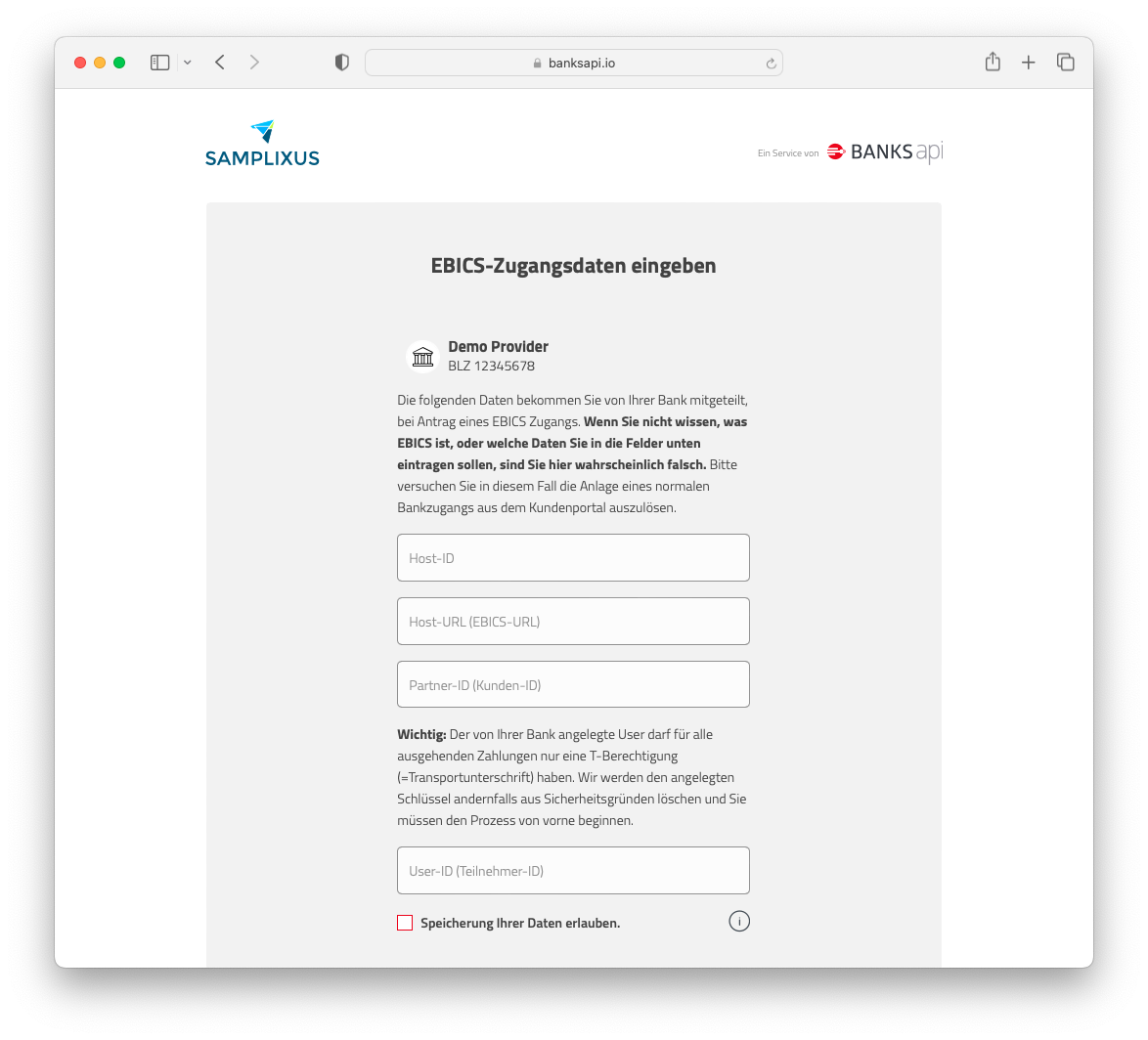 |
| Receiving the ini letter | 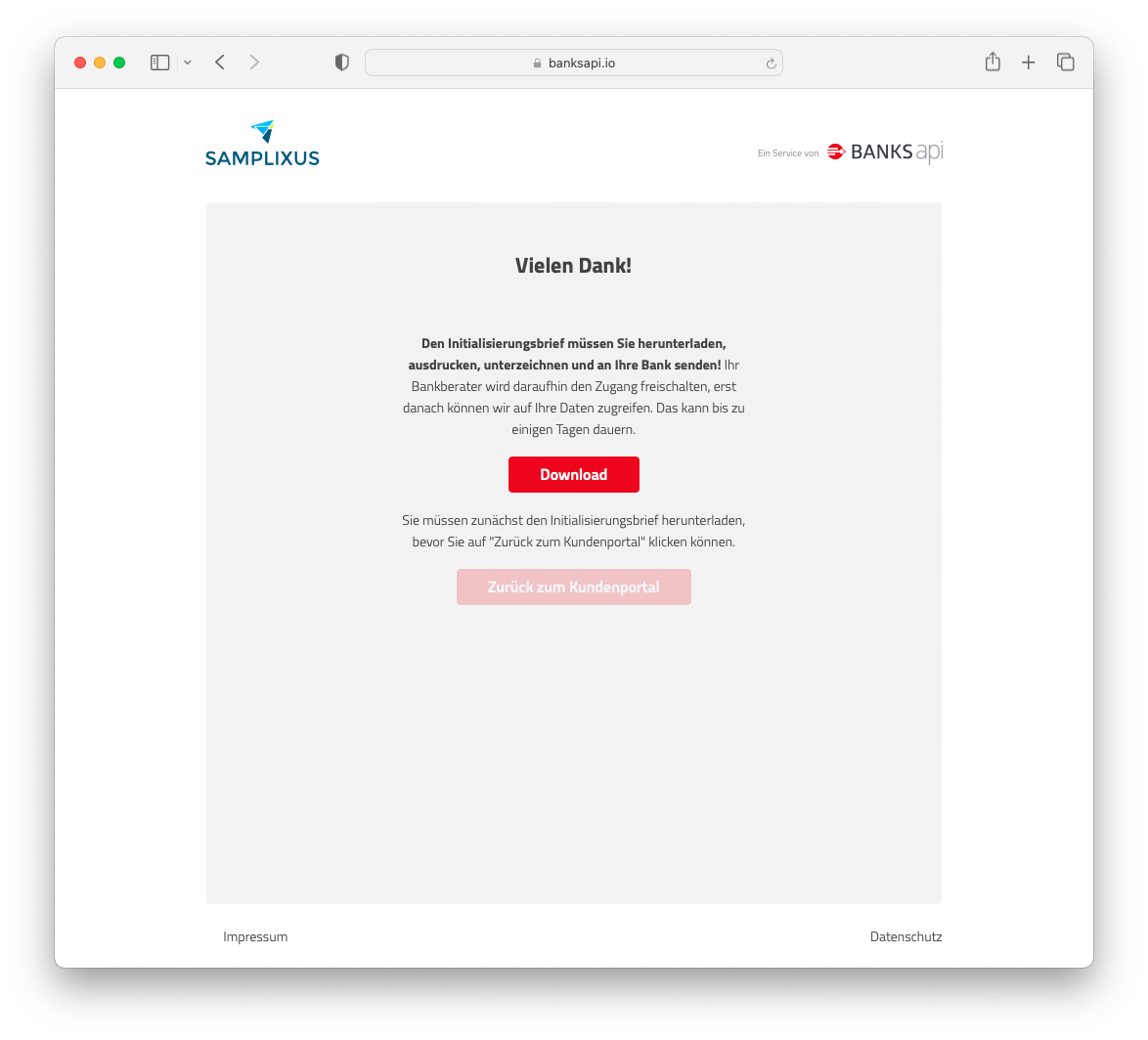 |
| The resulting ini letter that needs to be signed | 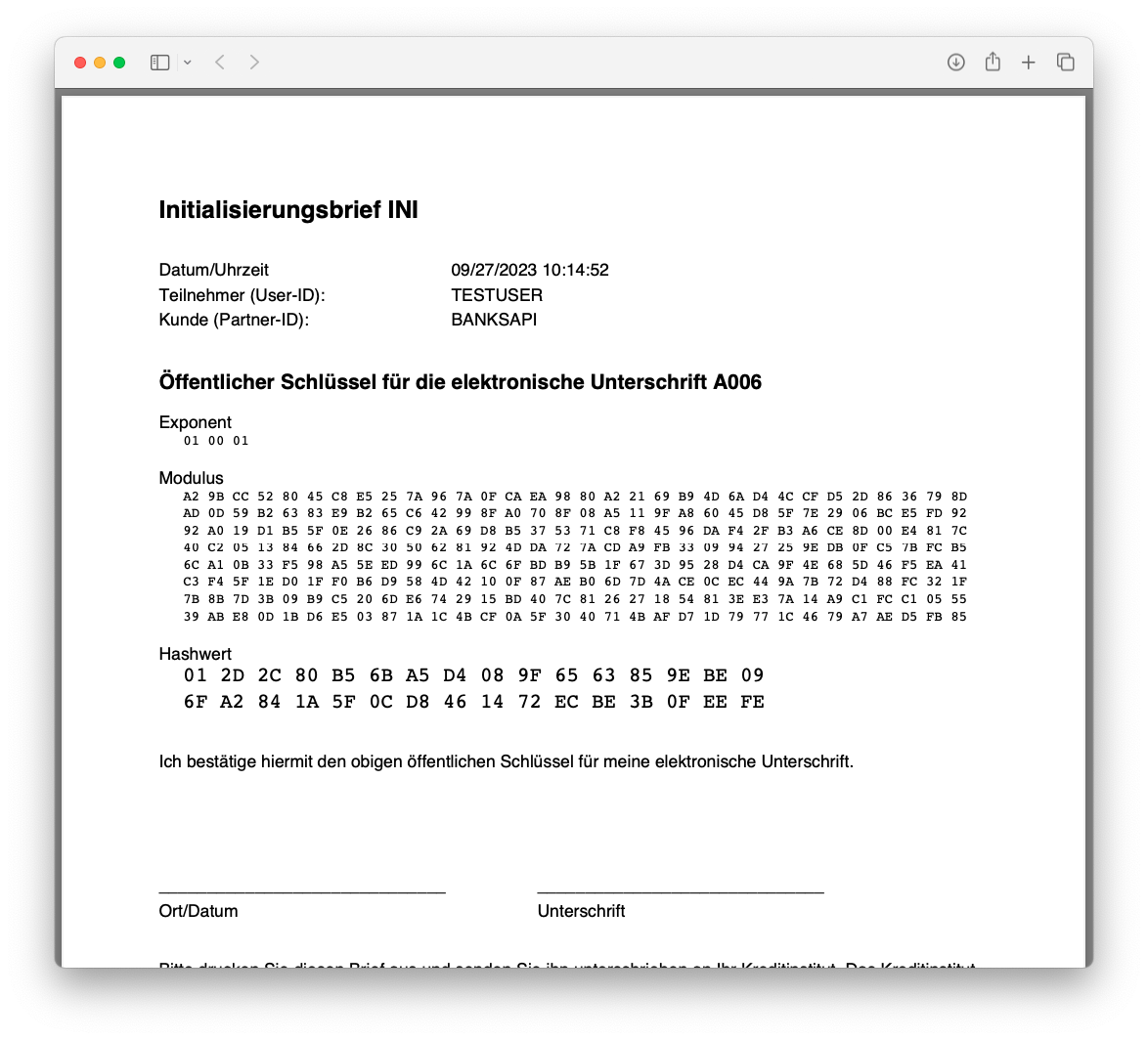 |
Initialization Letter Generation
BANKSapi has at this point generated an initialization letter containing the hash of the keys generated. The user should download this letter, and the keys will not leave BANKSapi's servers.
Verify the Bank Access
{
	"id": "189d22f6-2d1a-4fa3-a22e-8db0d7e47453",
	"providerId": "00000000-0000-0000-0000-000000000000",
	"aktualisierungszeitpunkt": "2023-09-14 13:40:20",
	"messages": [{
		"level": "INFO",
		"code": "BA2004",
		"message": "Bankzugang noch nicht freigeschaltet",
		"details": "Der EBICS Zugang ist noch nicht freigeschaltet."
	}],
	"tanMedien": [],
	"sicherheitsverfahren": [],
	"challenge": {
		"name": "EBICS Initialisierungsbrief",
		"content": {
			"instructions": "Bitte senden Sie den Initialisierungsbrief unterschrieben an die Bank.",
			"PDF": "data:application/pdf;base64,JVBERi0xLjQN ... 3MzUNCiUlRU9G"
		},
		"decoupled": false,
		"redirect": false
	},
	"relations": [{
			"rel": "self",
			"href": "https://banksapi.io/customer/v2/bankzugaenge/189d22f6-2d1a-4fa3-a22e-8db0d7e47453"
		},
		{
			"rel": "refresh_bankzugang",
			"href": "https://banksapi.io/customer/v2/bankzugaenge"
		},
		{
			"rel": "delete_bankzugang",
			"href": "https://banksapi.io/customer/v2/bankzugaenge/189d22f6-2d1a-4fa3-a22e-8db0d7e47453"
		},
		{
			"rel": "get_issues",
			"href": "https://banksapi.io/customer/v2/bankzugaenge/189d22f6-2d1a-4fa3-a22e-8db0d7e47453/issues"
		},
		{
			"rel": "get_challenge_pdf",
			"href": "https://banksapi.io/customer/v2/bankzugaenge/189d22f6-2d1a-4fa3-a22e-8db0d7e47453/challenge/pdf"
		}
	],
	"type": "EBICS",
	"status": "VOLLSTAENDIG",
	"bankprodukte": [],
	"sync": true
}
After redirection to the callbackUrl and the user completing the process and returning to your website, the bank access should be in a VOLLSTAENDIG state with a BA2004 message indicating that bank access is not yet activated. The ini letter can be retrieved by you as well:
- By the base64 encoded string in
challenge.content.PDF - By the relation
get_challenge_pdfwhich makes the PDF available for download throughContent-Disposition: attachment;
TIP
BANKSapi will now attempt to fetch data 4x a day until the bank confirms the hash.
User Sends Initialization Letter to the Bank
The user needs to print, sign, and send the letter to the bank. Some banks might accept electronic versions. Once the bank confirms the hash and activates the account, BANKSapi will be able to fetch data.
INFO
If the user has permissions beyond T-grants, BANKSapi will delete the set of keys, resulting in a BA1020 message. The EBICS user needs to be re-created with the correct credentials, and the process needs to be reiterated.
Successful Connection
If all steps are successful, and the bank has confirmed the hash, the status will be VOLLSTAENDIG with an ebics: true flag, and all endpoints for fetching the bank access, transactions, and payments will be available for this account.
Comparison to Non-EBICS Bank Accesses
To summarize, the difference to non-EBICS bank accesses is primarily a more heavy interaction by the user with their bank. Primarily, the EBICS account (T-User) needs to already have been created at the time the user attempts to add the EBICS bank access / is redirected to our REG/Protect frontend. Afterwards, the bank access is not immediately available, but needs to be confirmed by the bank after the REG/Protect process.
Caveats
Initializing multiple times
Depending on the bank, an EBICS access cannot be initialized several times, but must be reset by the bank.
Balance Retrieval Limitation
In EBICS, there's no way to get the balance of an account without fetching its transactions. There might not be any transactions, i.e. also no balance, because of the historical transaction limitation
Historical Transaction Limitation
With EBICS, we might not be able to get transactions that are older than when the bank access was created.
Transaction History Range
Currently, we will fetch transactions up to 90 days back.